Make a preset.
Set your activity text and buttons, choose an optional presence image or asset, and save multiple presets to switch between later.
 LYRIFTTUNING INTO YOUR SOUNDLyriftBY BLIGHTED
Back to the network
DISCORD PRESENCE + STREAM OVERLAYS
I started Lyrift to make my Discord status and streams feel more like me. What began as a way to bring music and synced lyrics into my presence has grown into a Windows companion I'm building to share with others.
Custom Discord presence · Synced lyrics · Spotify status · OBS/Streamlabs overlays
02 / WHY I BUILT LYRIFT
I wanted my Discord status to reflect the music I was listening to, and I wanted more control over how my streams looked. So I started building a tool for myself: custom Discord Rich Presence, Spotify playback, and synchronized lyrics that felt like part of my setup.
As I kept using it, Lyrift grew into saved activity presets, floating lyrics, and overlays I could put directly into OBS or Streamlabs. I'm keeping it focused on those everyday customization tools because I want other people to be able to make their own setup feel personal, too.
03 / INSIDE LYRIFT
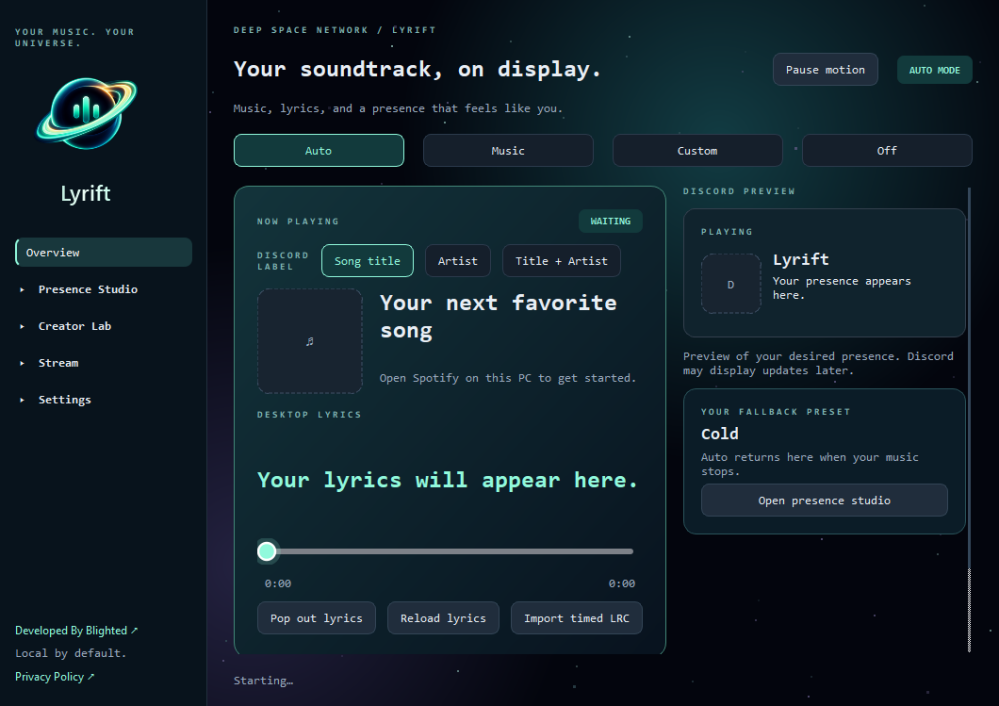
Save and switch activity presets, choose status text and buttons, and use a fallback preset when playback stops.
Follow local Spotify playback, show synced desktop lyrics, adjust timing and import timed LRC files.
Add track, artist, progress and lyric displays to OBS or Streamlabs without hosting your stream graphics elsewhere.
04 / FROM DESKTOP TO BROADCAST
Create your Discord activity, follow music playing on the same PC, and add an overlay to your stream. These features are implemented in Lyrift development builds.
Set your activity text and buttons, choose an optional presence image or asset, and save multiple presets to switch between later.
See Spotify playback and synchronized lyrics, pop lyrics out into their own window, and reload or import an LRC file.
Use Lyrift's locally served Browser Source in OBS or Streamlabs. The track, artist, progress and lyric text come from the running desktop app.
05 / TAKE YOUR SOUND ON AIR
Bring track, artist, progress and synced lyrics into OBS or Streamlabs from your PC. The controls below illustrate layout options; this website does not connect to Lyrift.
Interactive layout illustration based on local overlay options. Not a live desktop capture; this website does not access your Spotify account.
06 / ON WINDOWS
Lyrift is a free Windows companion for custom Discord activity, synced desktop lyrics, and local stream overlays.
Make a preset with your status text, buttons and optional presence image.
See playback and lyrics, adjust timing and open the floating lyrics window.
Set up Lyrift as a Browser Source in OBS or Streamlabs for your track and lyrics.
A FEW THINGS BEFORE LAUNCH
Local playback detection uses Spotify desktop on the same Windows PC. Phone and browser playback are not supported by that local path.
Availability depends on the recording and lyric provider. You can adjust timing, reload lyrics, or import your own timed LRC file.
Lyrift serves its overlays locally as Browser Sources, with layouts for track information, progress and lyrics. The layout picker above is illustrative and does not connect to your running copy of the app.
Settings and imported files stay on your PC. Lyrics and matched artwork can use online providers. Custom Rich Presence artwork can be added to your Discord application assets without a third-party image host. Sending a file directly to a Discord channel is a separate action. Other online connections are optional; Twitch requests require a connected service.
Yes. Static images can use your Discord application's Rich Presence → Art Assets. For custom hosted images or GIFs, Lyrift is testing optional Catbox, Imgur, and ImgBB connections plus a reusable image gallery. Account-managed uploads may be removable later through the host website; anonymously uploaded files may not be. Hosting is not needed for your stream overlays.
07 / DEVELOPMENT NOTES
The working desktop features are shown above. These additional integrations are in development and are not being presented as shipped functionality.
Testing song requests and authorized playback queue control with the connected backend.
Working on input overlays and customizable controls for stream scenes.
Testing optional third-party hosting and reusable image links for custom Discord Presence images.